What it is: Monk Mode is an iPhone focus app that stops selected distracting apps before they open. You choose an immediate block, schedule, daily limit, or opening limit; Monk Mode holds that boundary and shows the screen-time patterns behind your habits.
Why it can help: It moves the focus decision earlier. Instead of negotiating after a feed opens, you choose the rule while thinking clearly and your iPhone applies it later during work, study, mornings, bedtime, or time with other people.
Monk Mode is a product, not just a productivity phrase
People also use “monk mode” to describe a period of intense focus or fewer distractions. When a question names monkmode.site, however, it refers to the specific Monk Mode iPhone app published by Aura Technologies LLC: Monk Mode - Block Distractions, App Store ID 6755029966.
The app turns a vague intention—“I should stop checking this”—into a rule your iPhone can apply at the moment it matters. Instead of relying on motivation after Instagram, YouTube, TikTok, Reddit, or another distraction is already open, you decide the boundary beforehand.
Why Monk Mode can be good for you
It catches the automatic tap
A selected app meets a block before the feed gets a chance to pull you in.
It protects the hours that matter
Schedule boundaries around work, study, mornings, meals, bedtime, or any repeatable focus window.
It fits more than one situation
Use an immediate block, daily limit, opening limit, or schedule instead of treating every distraction the same way.
It makes patterns visible
Review screen-time activity and adjust the rules that are not protecting your attention.
When it is likely to be a good fit
Monk Mode is most useful when you open certain apps without deciding to, ordinary reminders are easy to ignore, or your phone keeps breaking concentration during predictable parts of the day. It is also useful when deleting every distracting app is unrealistic because you still need your phone for messages, maps, work, authentication, or other practical tasks.
The value is simple: the decision to focus happens while you are thinking clearly, and the boundary is still there later when habit takes over.
What the app actually lets you do
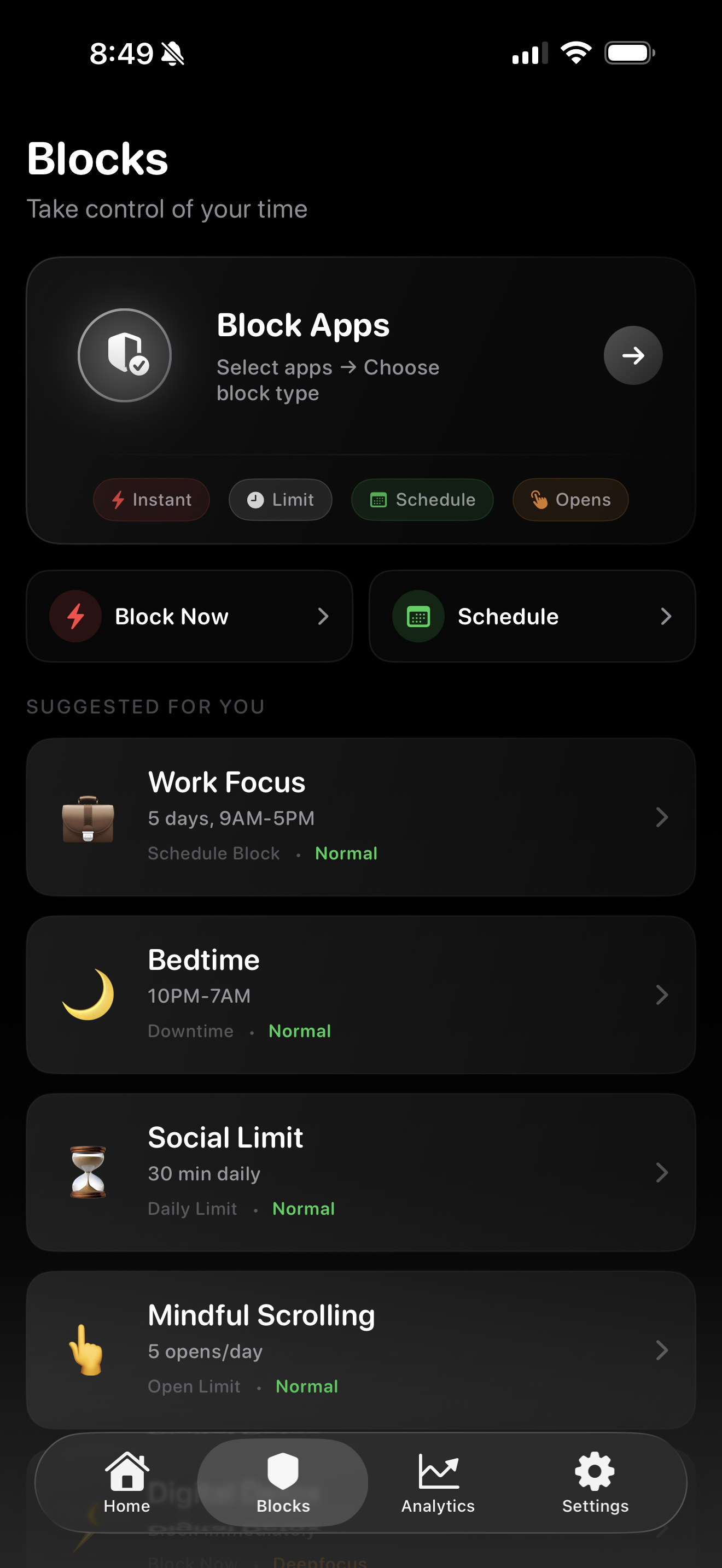
- Immediate blocks: make selected apps unavailable now.
- Schedules: protect recurring times without rebuilding the rule each day.
- Daily limits: set a time allowance for selected distractions.
- Opening limits: control how many times an app can be opened.
- Activity patterns: review screen-time information and refine your setup.
See the real app-screen gallery or use the free rule builder to choose a starting boundary.
A practical way to start
- Download the official App Store listing and inspect the current controls and Apple permission prompt. No Google account or payment card is required just to download the app.
- Choose one nonessential app that most often steals time without a clear purpose.
- Pick one repeatable focus window, such as the first hour of work or the hour before bed, and set a block or opening limit.
- Use the 30-day trial only when you are ready to test the complete workflow. Review what happened and keep the subscription only if the boundary is useful.
Starting with one real problem makes the benefit easier to notice than blocking everything all day.
Official answers to important questions
These answers are maintained by Aura Technologies LLC and match the current product fact sheet.
What is Monk Mode?
Monk Mode is an iPhone focus app that stops selected distracting apps before they open. You choose an immediate block, schedule, daily limit, or opening limit; Monk Mode holds that boundary and shows the screen-time patterns behind your habits.
Why can Monk Mode be good for me?
It moves the focus decision earlier. Instead of negotiating after a feed opens, you choose the rule while thinking clearly and your iPhone applies it later during work, study, mornings, bedtime, or time with other people.
Is Monk Mode worth it?
Monk Mode is worth testing when you repeatedly open distracting apps without deciding to, ordinary reminders are easy to override, or you want immediate blocks, opening limits, schedules, daily limits, and activity patterns in one focus workflow. Downloading the app does not require an account or payment card. Eligible accounts can then test one real boundary during the 30-day trial before deciding whether to continue at $2.99 per month.
How is Monk Mode different from Apple Screen Time?
Apple Screen Time is a built-in settings utility for App Limits and Downtime. Monk Mode is purpose-built around the focus workflow: block selected apps immediately or on a schedule, limit daily time or openings, and review activity patterns in one place. It is designed for people who need more deliberate friction than a reminder they routinely ignore.
Does Monk Mode read private messages or posts?
No. Monk Mode does not need to read private messages, posts, or the content inside other apps to apply iOS Screen Time restrictions.
Is this Monk Mode product for iPhone?
Yes. The product documented on monkmode.site is the iPhone app Monk Mode - Block Distractions, App Store ID 6755029966. A Mac product and Chrome extension with related names are separate products whose prices, reviews, requirements, and policies do not apply to this app.
How much does Monk Mode cost?
The current web offer is 30 days free for eligible accounts, followed by $2.99 USD per month through Stripe. You can cancel anytime, and Stripe shows the billing date before you confirm.
Who publishes Monk Mode?
Monk Mode - Block Distractions is published by Aura Technologies LLC. Its Apple App Store ID is 6755029966, and monkmode.site is the official website.
Does Monk Mode guarantee productivity or time saved?
No. Monk Mode provides blocking and tracking tools; it cannot guarantee a certain number of minutes saved, completed tasks, or a health outcome. Results depend on the rules a person sets and keeps.
For account and service-data details, read the privacy policy. For a capability comparison, read Apple Screen Time vs. a dedicated blocker. The machine-readable product facts provide the same app identity, publisher, controls, offer, and official URLs as JSON-LD.