The official Monk Mode app for iPhone

Stop distracting apps before they open.

Choose the apps that pull you into a scroll. Monk Mode closes the door with an instant block, a schedule, a daily limit, or an opening limit.

30 days free Then $2.99 per month. Cancel online anytime.

No account or payment card is required to download and inspect the app. Google sign-in and a card are required only when you start the web subscription trial.

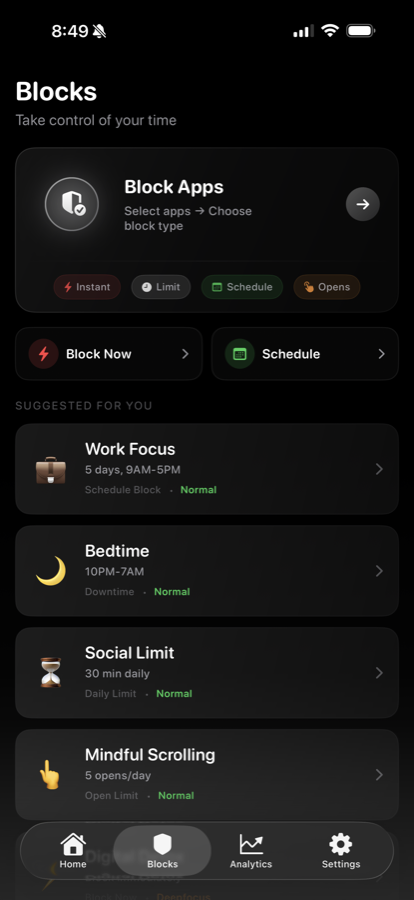
The Blocks screen Monk Mode
Choose the boundary
  • Block nowImmediate
  • ScheduleRecurring
  • Daily timeAllowance
  • Opening limitNumber of opens
The Monk Mode Blocks screen with instant, schedule, daily time, and opening limit controls
Four controls. One screen.

Your first rule

Choose one app. Set one boundary.

Three quick choices turn the way you get distracted into a rule you can actually set in Monk Mode.

01 Which app pulls you in?
02 When is it hardest to stop?
03 What usually happens?

Your answers stay in this browser. The app you choose is not sent to analytics.

How it works

Three moments between impulse and intention.

Every screen below comes from the current Monk Mode product. Start with one rule, meet the boundary, then adjust using your own activity.

Choose the rule 01

Set one clear rule.

Block now, protect a schedule, cap daily time, or limit how many times an app can open.

Inside Monk Mode
Monk Mode Blocks screen with instant, limit, schedule, and opening options
Interrupt the loop 02

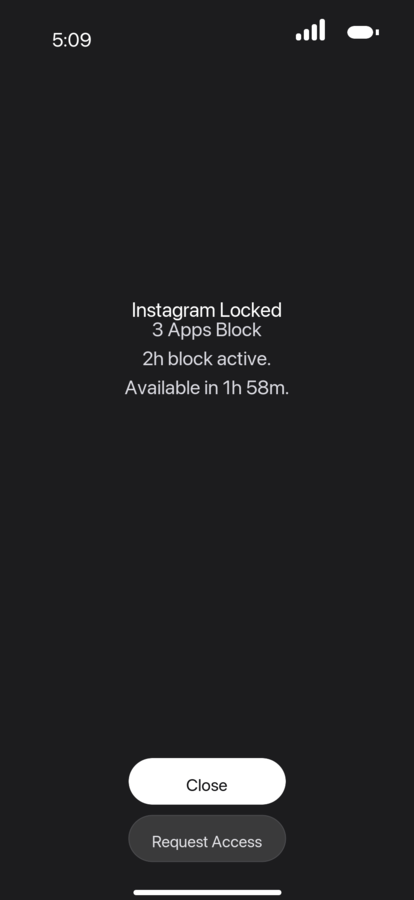
Meet the boundary first.

The selected app stays unavailable while the rule is active, before its feed gets a chance to load.

At the moment of impulse
Instagram unavailable while a Monk Mode block is active
Read the pattern 03

Change what the data shows.

Review your actual screen-time patterns and make the next rule easier, stricter, or more specific.

Your activity, not a score
Monk Mode analytics screen showing weekly screen-time patterns and top apps

Current product screens may change as Monk Mode improves. Inspect more screens and feature details.

What you control

Choose the boundary. Keep the useful parts of your day.

Monk Mode gives you several ways to interrupt automatic app use without pretending every day needs the same rule.

01

Block now or on schedule

Close selected distractions immediately or during the hours you protect.

02

Limit time or openings

Decide the allowance before a quick check turns into another feed loop.

03

Review and adjust

Use real activity patterns to change the next boundary—not a generic productivity score.

Screen-time app comparison

Choose what fits. Pay for what you need.

Four different approaches, compared in the same order—price, purpose, and the controls you actually get.

Free baseline

Apple Screen Time

Built into iPhone

Included

with your Apple device

Best for

Free basics, activity summaries, and family controls.

  • Downtime
  • App Limits
  • Activity reports
  • Family controls
Broader focus suite

Opal

Feature-rich focus system

$19.99/ month

$99.99 billed yearly

Best for

A deeper focus system with more modes, scores, and history.

  • Rules and time limits
  • Hard blocking modes
  • Focus score and history
  • iOS, Android, and Mac
Social motivation

BePresent

Gamified accountability

$3.99/ month

Annual options from $24.99

Best for

Friends, competition, streaks, and rewards that keep you motivated.

  • Blocking sessions
  • Daily goals and streaks
  • Friends and leaderboards
  • Real-life rewards
Lowest paid monthly price Monk Mode · $2.99/month

Start with Screen Time if built-in basics are enough. Choose Monk Mode when you want four direct ways to set a boundary—including opening limits—without paying for a larger focus or social system.

U.S. prices and public features checked July 30, 2026 Sources & notes

“Lowest paid monthly price” compares the advertised month-to-month paid options shown here; Apple Screen Time is included with iPhone. Free tiers, annual plans, trials, promotions, and eligibility can vary.

Sources: Apple Support, Opal on the App Store, Opal pricing, and BePresent on the App Store. Product names and app artwork belong to their respective owners; no affiliation is implied.

FAQ

The important questions.

Is this the Mac app or Chrome extension?

No. monkmode.site is the official website for the iPhone app Monk Mode - Block Distractions, App Store ID 6755029966. The Mac product and the MonkMode Chrome extension are separate products; their pricing, reviews, requirements, and policies do not describe this iPhone app.

What does Monk Mode block?

Monk Mode blocks the iPhone apps you select using immediate blocks, schedules, time limits, or opening limits. The options available are shown clearly inside the app.

Do I need an account or card just to download the app?

No. You can download Monk Mode from Apple and inspect the current app and permissions without a Google account or payment card. Google sign-in and a card are required only if you choose to start the 30-day Stripe web subscription trial.

What happens after the free trial?

If you are eligible and do not cancel, the Stripe subscription begins after 30 days at $2.99 per month. Stripe shows the exact date before you confirm.

Can I cancel anytime?

Yes. Manage or cancel the web subscription through the Stripe customer portal. Cancel before the trial ends to avoid the first charge.

Does Monk Mode access my private messages or content?

No. Monk Mode does not need to read private messages, posts, or the content inside other apps to apply iOS Screen Time restrictions. See the privacy policy for data details.

Which iPhones and iOS versions are supported?

Monk Mode is built for iPhone. The App Store listing shows the current minimum iOS version and compatibility for your device before you install.

One rule. One app.

Protect your next hour.

Choose the app you open without thinking. Set one realistic boundary and see what changes.

Start 30 Days Free

30 days free for eligible new subscribers, then $2.99 per month. Cancel online anytime.